

What happened
In October 2026, Starlink quietly added passkey sign-in to its customer accounts. No press release, no blog post — just a new article in the Starlink Help Center. You no longer have to type a password: a glance at your phone, a fingerprint, or a tap on a hardware security key is enough.
It looks like a minor settings update. In fact, it changes the very principle behind how the account is protected. Here is what a passkey is, what it fixes, and what it leaves untouched.
A passkey is a key, not a password
A password is like a door-entry code: you know it, the server knows it, and anyone can peek at it, guess it or talk you out of it. A passkey is more like a physical key that never leaves your pocket. The website keeps only the lock. Even if a thief stole every lock on the server, none of them would open a single door.
Your face or fingerprint is not the password either. It only unlocks the key on your own phone and never leaves the device. Starlink says it never sees your biometrics. The technology itself is an open standard backed by Apple, Google and Microsoft.
How it works
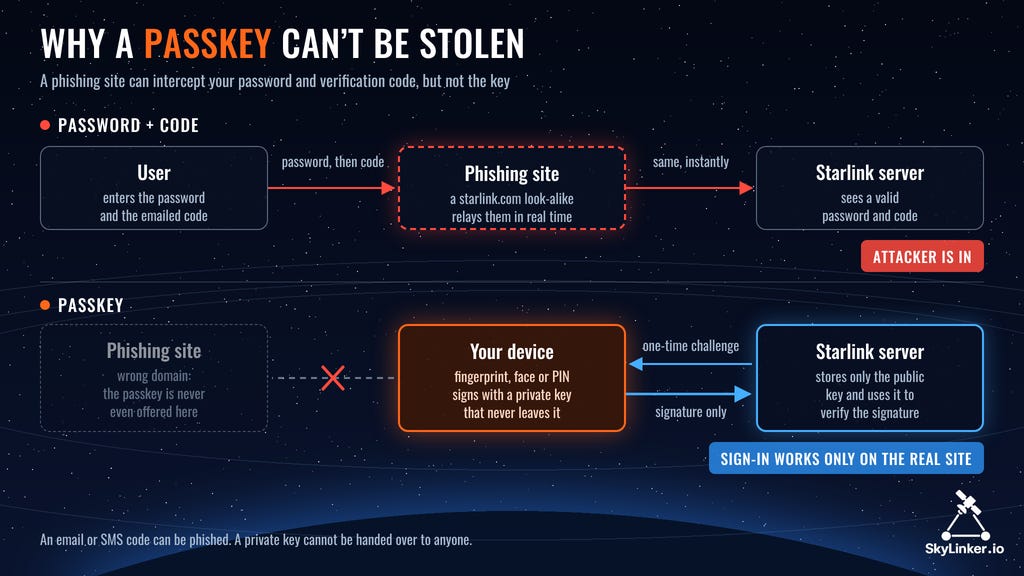
When you sign in, the Starlink server sends your phone a one-time puzzle, known as a challenge. The phone solves it with a private key, and the server checks the answer with the matching public key. No secret ever crosses the network, and each answer is good for a single sign-in only.
The key also remembers which website it was created for. A fake page such as starIink-support.com simply won’t be recognised, so the key won’t fit a painted-on door, however convincing it looks.
This is exactly where two-step verification falls short. A phishing site can act as a middleman: you type your password into it, it passes the password straight to the real Starlink, Starlink emails you a code, you type the code into the fake page — and the attacker is in. With a passkey the trick fails, because on someone else’s domain the key never even shows up.
How to turn it on
Sign in at starlink.com.
Open Settings → Privacy & Security Preferences.
Under Passkeys, choose Add passkey to save one on your phone, computer or in a password manager, or Add hardware key to use a physical key such as a YubiKey.
Confirm with your face, fingerprint or PIN.
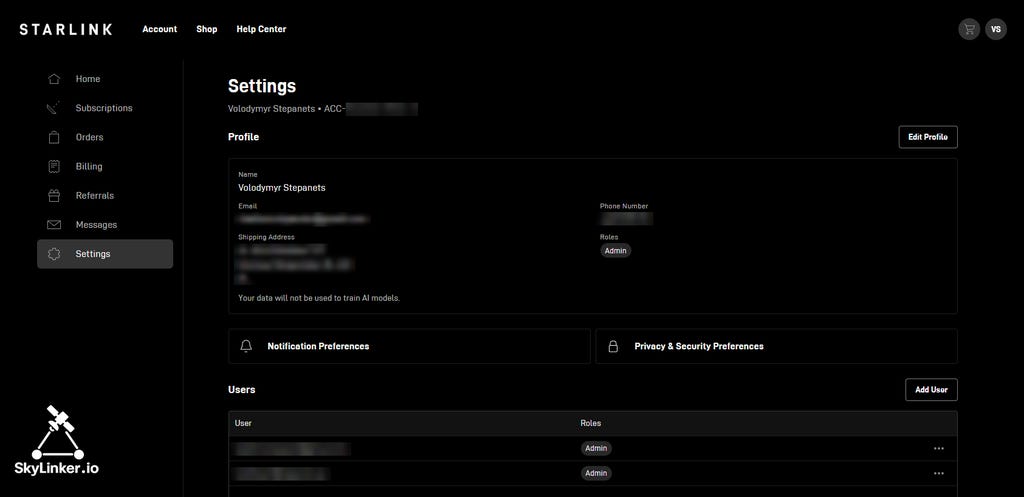
Step 2: in your account settings, open Privacy & Security Preferences. The same page lists the account’s users and their roles.
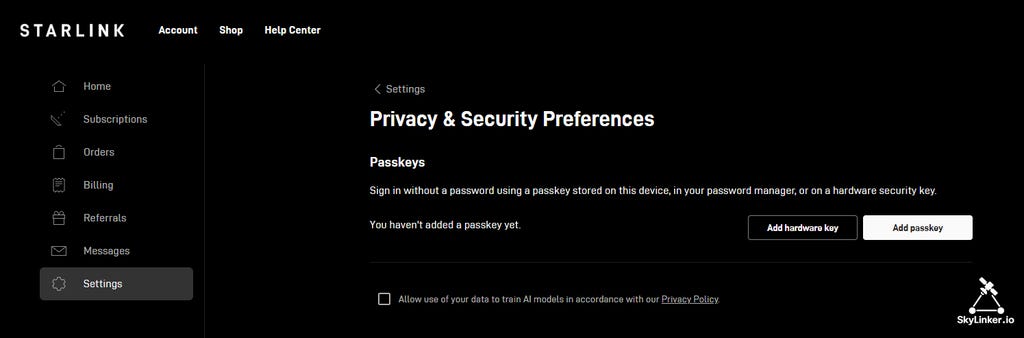
Step 3: Add passkey stores it on your device or in a password manager; Add hardware key puts it on a physical security key.
Each account can hold up to 10 passkeys. Accounts that must sign in through corporate single sign-on (SSO) can’t add them. Starlink doesn’t say whether passkey sign-in works in the mobile app.
What it changes in practice
No password to remember. Most people open their Starlink account rarely — to change a plan, pause service or contact support. By then the password is long forgotten, and recovery turns into a chain of emails and codes. A passkey lives on your phone, and signing in takes a second.
Less dependence on codes. Today Starlink sends a one-time code to your email at sign-in, with SMS as a fallback (Two Step Verification). But an email won’t arrive without internet — and your internet is Starlink. SMS needs mobile coverage and that very SIM card. And a code, like a note slipped under the door, can be coaxed out of you by a call from “support”. A passkey can’t be coaxed out: there is nothing to hand over. Starlink has not yet said whether the email code is still requested when you sign in with a passkey.
The catch
A lost phone. If the passkey lived only on that phone, this way of signing in disappears with it. A passkey synced through a password manager (iCloud, Google, 1Password, Bitwarden) survives the loss, but it is only as safe as that cloud account. Lost a device? Remove its passkey in Settings right away.
The old door is still there. A passkey doesn’t replace the password, and the password can’t be switched off. Meanwhile, account recovery by email or SMS signs you straight in. So the front door gets a new high-security lock, while a spare key still hangs at the concierge desk. Whoever controls your email or your SIM card controls your Starlink account too.
What to do
This is no small matter in Ukraine, where a single Starlink account of a volunteer foundation, a military unit or a hospital can control dozens of terminals. The same applies to any company running a fleet of them.
Turn passkeys on and add at least two: one on your phone and one on a separate hardware key.
Protect the account’s email just as well — that is where access gets recovered.
Don’t share one login among several people. Starlink lets you add users with separate roles, and someone who only reboots a terminal doesn’t need access to billing.
When someone leaves or loses a device, remove their passkey and their user the same day.
Never read a verification code to anyone: Starlink will never call or text you to ask for it.
Bottom line: turn it on — a passkey is more convenient and safer than a password. But as long as the old password and SMS recovery keep working alongside it, the real fortress is still to come.
The support of paid subscribers of SkyLinker.io will allow us to share even better and even more independent analytics, interesting reviews, and produce training and educational materials. From an inexpensive subscription costing a few cups of coffee per month to a more significant “Patron” level — all of this is clearly and qualitatively converted into information and knowledge, primarily for the defenders of Ukraine.
All the most interesting things from the world of communication and space technologies are also available in the form of educational audio podcasts and video lectures both on the website and on the SkyLinker Youtube channel.
Global Changes to Roaming Availability for Starlink Users

Beginning August 17, all Starlink users on the Roam plan and similar plans will be able to use their terminals while traveling only within their home country or region. Maintaining Starlink connectivity while traveling outside the user’s home country will require the
EW vs. Starlink: What Actually Works?

For the fifth year, we have been observing the battlefield changes brought about by LEO SatCom systems, such as Starlink. The practical use of Starlink by the Ukrainian Defense Forces has not only proven the resilience of such communications but also laid the groundwork for the dawn of the “Drone Warfare Era.”

Starlink in Ukraine – a New Story of Protecting SatCom Sovereignty

Ukraine has introduced a number of restrictions on the use of Starlink satellite communications on its territory. On January 29, the new Minister of Defense of Ukraine, Mykhailo Fedorov, officially announced his request to SpaceX regarding solving the